
What Is ZIMRA?
The Zimbabwe Revenue Authority (ZIMRA) is the government agency responsible for collecting taxes, enforcing fiscal laws, and ensuring businesses follow proper VAT regulations. ZIMRA manages customs duties, income tax, corporate tax, and VAT and oversees the national fiscalisation program that requires businesses to use approved fiscal devices and POS systems.

In Zimbabwe, ZIMRA plays a critical role in:
-
Ensuring accurate VAT reporting
-
Reducing tax evasion through digital tracking
-
Implementing fiscalisation across industries
-
Approving and regulating fiscal devices
-
Conducting compliance audits
-
Protecting consumers through verified fiscal receipts
ZIMRA’s goal is to create a transparent, digital-first tax environment. This is why modern systems like Sales Intellect POS, which support fiscalisation, are now essential for Zimbabwean businesses.
Why ZIMRA POS Integration Matters
Tax compliance in Zimbabwe has changed dramatically.
ZIMRA is increasing digital enforcement, fiscalisation checks are now more frequent, and businesses using outdated POS systems are facing heavy penalties.

Because of this, thousands of retailers, restaurants, pharmacies, and hardware shops are switching to modern cloud POS solutions like Sales Intellect POS to avoid errors, penalties – and stay 100% compliant.
Zimbabwe’s tax system continues to shift towards full digitalisation. As part of this transformation,ZIMRA requires all VAT-registered businesses to use fiscalised POS systemsthat can send encrypted sales data automatically to the revenue authority.
In 2025, ZIMRA strengthened its enforcement rules:
-
More routine compliance audits
-
Mandatory VAT reporting for bothUSD and ZWG sales
-
Stricter validation of fiscal receipts
-
Increased penalties for businesses without compliant POS setups
However, modern POS platforms – especially Sales Intellect POS, which is designed for global fiscalisation – make compliance simple. Sales Intellect pos streamlines reporting, automates tax calculations, supports fiscal printers, and ensures every receipt meets ZIMRA’s standards.
This guide walks you step-by-step through everything Zimbabwean businesses need: rules, requirements, integration process, device compatibility, and how to implement Sales Intellect POS for fast and error-free fiscal compliance.
Understanding ZIMRA Fiscalisation
What Is ZIMRA FDMS Integration?
ZIMRA FDMS integration is the process of connecting your business’s POS system to a ZIMRA-approved fiscal device, which:
-
Receives each sale automatically
-
Applies digital encryption
-
Generates a fiscal signature
-
Sends the data to ZIMRA servers
-
Prints a compliant receipt with a verifiable QR code signature
Sales Intellect POS supports this full workflow, ensuring correct VAT calculation and seamless tax reporting.
Purpose of ZIMRA Fiscalisation
The fiscalisation mandate exists to:
-
Prevent tax evasion
-
Standardise VAT reporting across Zimbabwe
-
Create transparent, real-time audit trails
-
Protect consumers with verified receipts
-
Reduce manual paperwork and fraud
Who Must Comply?
Any business issuing tax invoices must be fiscalised, including:

-
Retail shops
-
Supermarkets
-
Restaurants, cafés, fast-food outlets
-
Hardware & building supply stores
-
Pharmacies
-
Clothing & electronics stores
-
Fuel stations
-
Wholesalers
Sales Intellect POS supports all these sectorswith multi-store, multi-terminal, and multi-location functionality – ideal for SMEs and high-volume operations.
ZIMRA Requirements
Mandatory Rules for 2025
To stay compliant, businesses must use:
-
Certified fiscal devices
-
Daily Z-Reports submitted to ZIMRA
-
Correct VAT calculation for USD + ZWG
-
Digital storage of audit-proof records
-
A POS system capable of fiscalisation
Penalties for Non-Compliance
Failing to comply results in:
-
Heavy fines
-
Business closure
-
Loss of tax clearance (ITF263)
-
Failed audits
-
Damage to business reputation
Using a ZIMRA-ready POS like Sales Intellect POS eliminates all these risks.
How ZIMRA POS Integration Works
Step-by-Step Data Flow
-
Sale is recorded in Sales Intellect POS
-
Transaction is sent to the fiscal device
-
Device encrypts and digitally signs the sale
-
Sales data transmitted to ZIMRA
-
ZIMRA validates and logs the data
-
Fiscal receipt printed (with signature / QR)
-
Sales Intellect POS dashboard updates instantly
Sales Intellect POS automatically applies the data format required by Zimbabwean fiscal devices.
ZIMRA-Approved Fiscal Devices
Types of Fiscal Devices
Businesses can use:
-
Fiscal printers
-
Fiscalised POS terminals
-
Electronic Signature Devices (ESDs)
-
Cloud-based fiscalisation (2025 pilot phase)
Why Device Compatibility Matters
Sales Intellect POS seamlessly connects to most fiscal printers used in Zimbabwe, ensuring:
-
Smooth configuration
-
Fast receipt printing
-
Accurate tax mapping
-
Stable data transmission
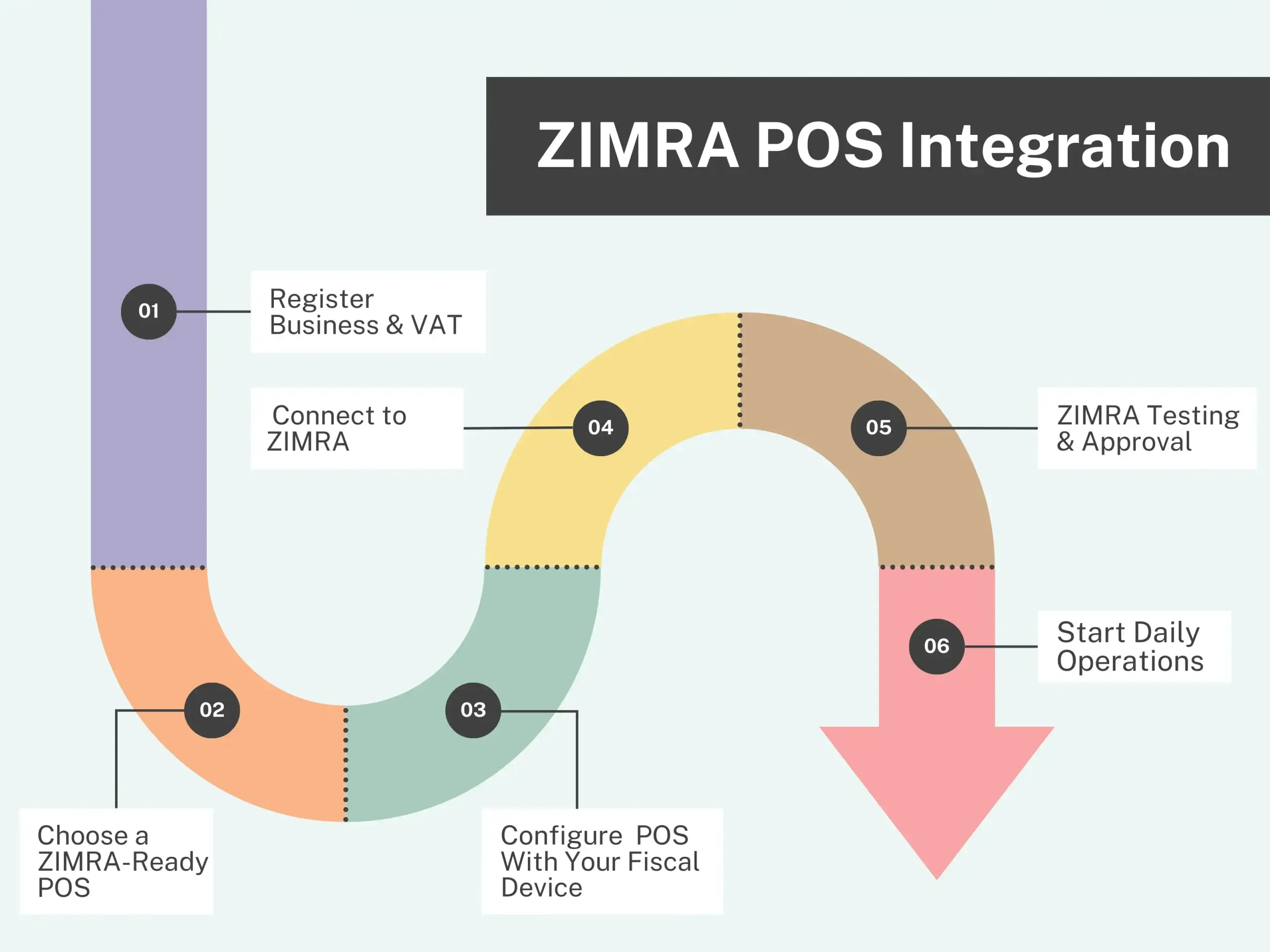
Full Step-by-Step Guide to ZIMRA POS Integration

Register Business & VAT
Ensure your business is VAT-registered and listed under the correct category.
Choose a ZIMRA-Ready POS (Why Sales Intellect POS Is Ideal)
Sales Intellect POS offers:
-
Multi-currency support (USD + ZWG)
-
Offline + online hybrid mode
-
Works for retail, restaurants, pharmacies & more
-
Easy product/price setup
-
Full compatibility with fiscal printers
-
Instant reports & analytics
-
Affordable Android setup
Configure Sales Intellect POS With Your Fiscal Device
Pair the POS with:
-
Fiscal printer (via USB, LAN, Bluetooth)
-
Or fiscal module
-
Map VAT categories
-
Test sample receipts
Connect to ZIMRA
Sales Intellect POS simplifies the process by:
-
Automatically formatting fiscal data logs
-
Reducing manual steps
-
Minimizing setup errors
ZIMRA Testing & Approval
Your local ZIMRA office checks:
-
Receipt format
-
Fiscal signature
-
Correct VAT calculation
-
Device connectivity
Start Daily Operations
-
Daily Z-reports
-
Automatic syncing
-
Cloud backups
-
Multi-branch visibility
-
Secure audit records
Benefits of ZIMRA Integration
Integrating your POS system with ZIMRA brings immediate efficiency and compliance advantages. Sales Intellect POS amplifies these benefits with automation, cloud syncing, and dual-currency support — giving Zimbabwean businesses a smoother, safer, and more transparent tax process. Below are the key benefits every business gains through proper ZIMRA integration.
Here areshort descriptionsfor each benefit:
1. Zero Paperwork
Sales Intellect eliminates manual books and handwritten invoices by digitizing all transactions automatically.
2. Automated, Error-Free VAT Calculation
VAT is calculated instantly and accurately for USD and ZWG, reducing human error and failed audits.
3. Faster Audits
With structured digital records, ZIMRA audits become quicker and more efficient.
4. No Missing Receipts
Every sale is tracked and stored, ensuring no gaps in fiscal reporting.
5. Real-Time Sales Monitoring
Sales Intellect’s cloud dashboard gives owners instant visibility of sales across all branches.
6. Avoid Penalties
Accurate reporting and correct fiscal receipts help businesses avoid costly ZIMRA fines.
7. Full Transparency
Digital audit trails ensure all transaction data is clean, accessible, and compliant.
Sales Intellect POS-Specific Advantages
-
Offline mode (critical during load-shedding or network drops)
-
Dual currency (USD + ZWG)
-
Multi-branch reporting
-
Cloud dashboard available anywhere
-
Works on affordable Android devices
-
Free 30 day trial
Comparison Table
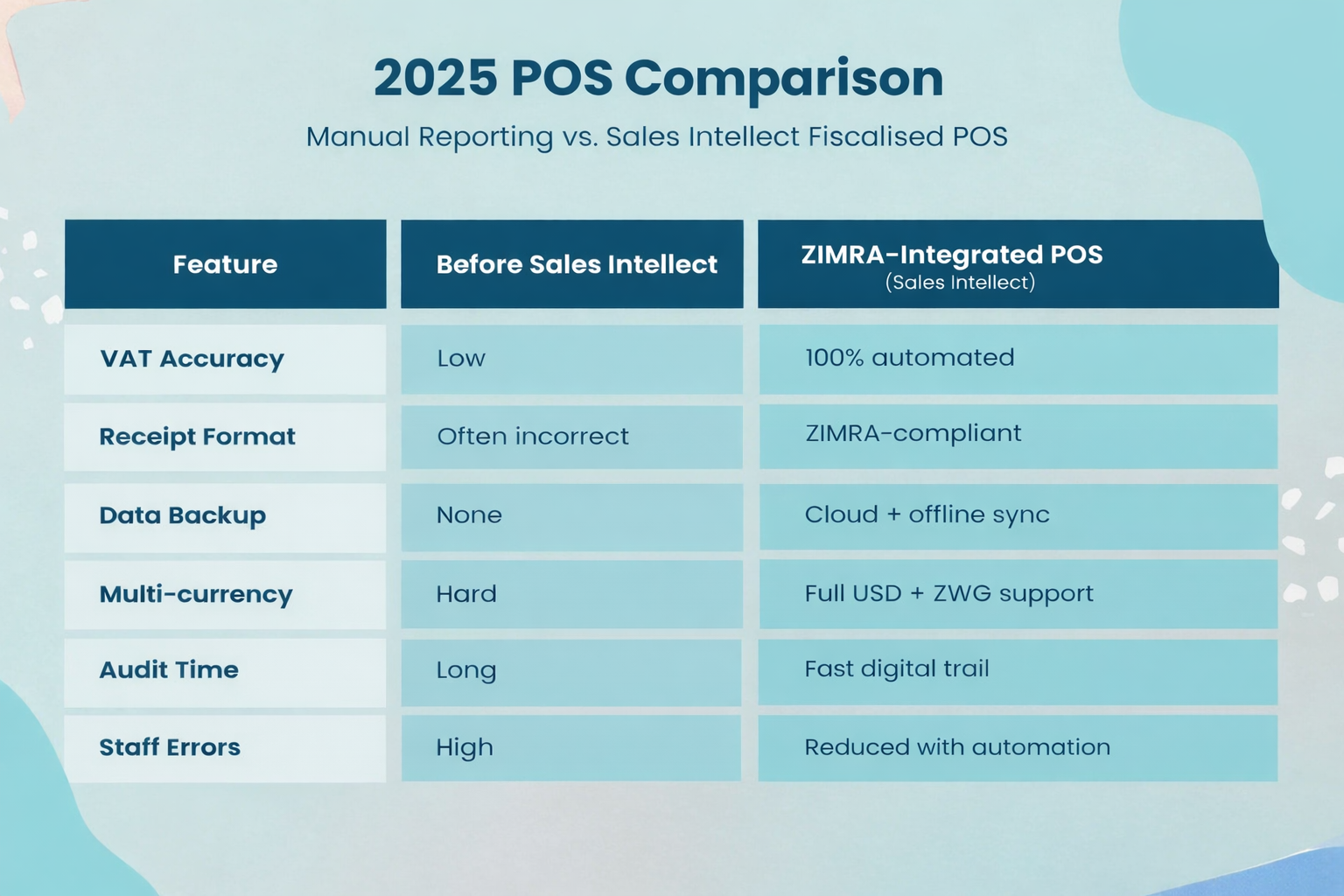
Many Zimbabwean businesses still rely on handwritten invoices and manual VAT calculations, which slow down operations and increase the risk of costly ZIMRA penalties. Sales Intellect POS removes these challenges with automated VAT, ZIMRA-compliant receipts, cloud backups, and full USD + ZiG support. The table below shows how Sales Intellect POS delivers faster, error-free, and fully compliant billing compared to outdated manual methods.
Common Challenges & Sales Intellect POS Solutions
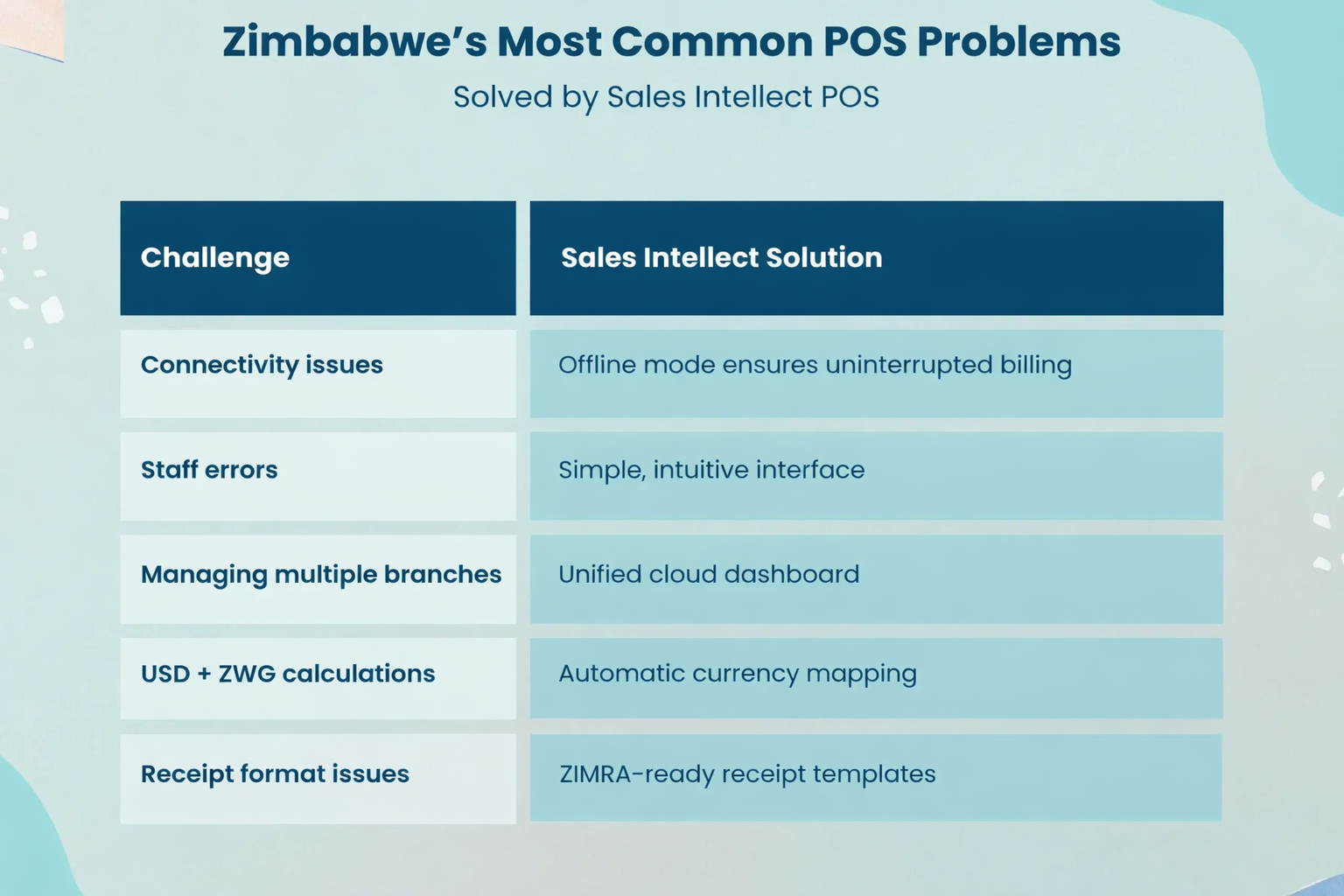
Zimbabwean businesses often face practical issues when trying to stay compliant from network outages to staff mistakes and multi-branch management. Sales Intellect is built to solve these everyday challenges with smart automation, offline capability, and ZIMRA-ready features. The table below shows how Sales Intellect POS removes the most common pain points and keeps your operations running smoothly.
Why Sales Intellect POS Is One of the Best POS Systems for Zimbabwe
Sales Intellect POS is considered one of the strongest POS choices in Zimbabwe because:
-
Built for fiscalisation
-
Supports all major fiscal printers
-
ZWG + USD dual-currency support
-
Works across industries
-
Offers inventory, CRM, POS, and reporting in one
-
Affordable for SMEs
-
Quick setup (same-day activation)
-
Local support availability
Best Practices for Smooth Compliance
1. Keep Fiscal Devices Firmware Updated
Ensure your fiscal printer or ESD always runs the latest firmware. Updates improve stability, fix errors, and maintain full ZIMRA compliance.
2. Set Correct VAT Mappings in POS
Accurate VAT mapping in Sales Intellect POS ensures every item is taxed correctly in USD and ZiG, reducing audit risks and preventing miscalculations.
3. Reconcile Reports Daily
Use Sales Intellect’s daily Z-reports and summary dashboards to verify sales, VAT amounts, and fiscal data before closing the day.
4. Train Staff With Sales Intellect POS Tutorials
Proper training reduces mistakes. Sales Intellect’s YouTube tutorials help staff understand billing, discounts, VAT, and fiscal receipt handling.
5. Keep Receipts Consistent
Always issue ZIMRA-approved receipts generated bySales Intellect POS. Consistent formatting helps with faster audits and customer verification.
6. Let Sales Intellect POS Auto-Backup All Data
Enable cloud sync so every sale is securely backed up. This protects your records during outages and ensures audit-ready digital storage.
ZIMRA Compliance Checklist
1. VAT Registration
Your business must be officially VAT-registered with ZIMRA before fiscalisation can begin. This ensures correct tax identification and reporting.
2. ZIMRA-Certified Fiscal Device
Use only approved fiscal printers or ESDs. These devices securely encrypt sales and transmit them to ZIMRA for validation.
3. ZIMRA-Ready POS (Sales Intellect POS Recommended)
A compliant POS such as Sales Intellect ensures accurate VAT calculations, dual-currency support (USD + ZWG), and seamless integration with fiscal devices.
4. Correct VAT Categories Set
Make sure your products and services are mapped to the right VAT rates. Sales Intellect lets you configure VAT groups to avoid misreporting.
5. Fiscal Receipt Format Verified
Your receipt must follow ZIMRA’s standard layout, including fiscal signatures/QR codes. Sales Intellect auto-generates ZIMRA-compliant receipts.
6. Working Daily Z-Report
Daily fiscal Z-reports are mandatory. They summarize all transactions and must be available for audits. Sales Intellect automates daily report generation.
7. Audit-Ready Digital Backups
ZIMRA requires accurate, retrievable sales records. Sales Intellect provides secure cloud backups plus offline sync for full audit readiness.
FAQs
Is Sales Intellect POS ZIMRA compliant?
Yes.Sales Intellect POSsupports ZIMRA fiscalisation workflows and integrates with ZIMRA-approved fiscal printers.
Can Sales Intellect POS work with fiscal printers?
Yes- via USB, LAN, or Bluetooth depending on the device.
Does Sales Intellect POS support ZiG currency?
Yes, Sales Intellect POS supportsUSD + ZWGwith correct VAT mapping.
How fast can I integrate Sales Intellect POS with ZIMRA?
Most businesses are operational within1–2 daysafter device pairing.
Can restaurants use Sales Intellect POS for fiscalisation?
Yes-Sales Intellect POS includes restaurant tables, KDS, modifiers, and kitchen printing.
Does Sales Intellect POS work offline?
Yes – offline mode ensures smooth operations even during network outages.
Does ZIMRA require cloud POS?
No, but cloud-based systems like Sales Intellect POS provide better audit trails and safer backups.
What is needed before fiscalisation?
VAT certificate, fiscal device, and a ZIMRA-ready POS system.
ZIMRA compliance is no longer optional- it’s essential for survival, smooth audits, and maintaining tax clearance. But compliance doesn’t have to be complicated.
Sales Intellect POS makes ZIMRA fiscalisation simple, automated, and 100% ready for USD and ZWG reporting.
If you want a modern, affordable POS system built for Zimbabwean businesses:
Get a ZIMRA-ready Sales Intellect POS & start compliant billing today.
Fast setup. Offline mode. Multi-currency. Fiscal printer support.

